AI Learning
Learn to build AI features from the ground up, one small example at a time that you can run and change.
This repo is for anyone starting to learn AI: a developer who has never called a model, or an experienced engineer who wants to understand how tool calling, RAG, MCP and agents really work before leading a team that builds them. Every topic starts from the basics, explains the idea in plain English, and gives you code you can run in minutes, then change to see what breaks. Step by step you learn prompting, then build tool calling, retrieval over documents, an MCP server, single and multi-agent workflows, and finally a small AI product with guardrails, evals, tracing and cost tracking.
The examples come from B2B e-commerce, at Acme Build, a made-up marketplace for building materials and industrial supplies: product catalogs, stock and prices, bulk quotes, customer credit, orders and reviews. You don't need to know the industry. A buyer asking "do you have 600 bolts, and what will they cost?" makes sense to anyone, and the same patterns carry over to banking, healthcare, logistics or any business with data and rules (each learning guide ends with a "Same pattern, other industries" table).
Everything runs on your own laptop with Ollama: no API keys, no cloud bill. Prefer a hosted model? Change two lines in
.env: see Model providers (OpenAI, Anthropic, Gemini, Groq, OpenRouter).
Start here
New to AI? Read AI basics first: how a model works, the six words every lab uses, and four calls you can try, in about 30 minutes. Want to see where this leads? The skills ladder shows what you can do at each level, fresher to architect, and which labs get you there.
What you can skip. This course is about building with models, not making them:
- Maths. No linear algebra, statistics or calculus. An embedding is "texts that mean the same land close together"; that's all the labs need.
- Training and fine-tuning. Every lab uses a ready-made model and changes only what you send it and what your code does with the answer.
- A GPU or a cloud bill. A 16 GB laptop runs everything; with 8 GB, use a free hosted model (below).
- An ML background. If you can write a function and read JSON, you're ready. New to Python? There's a short prereq.
- Frameworks first. Each pattern is hand-rolled so you see every part; LangGraph comes only at the end of two topics, to compare.
- Reading everything. The Core path is 28 labs; the rest wait until your work needs them, and files marked Skip are plumbing.
Your first hour: set up once, check it, then run the prompting labs one after the other. Every lab works the same way: read its docstring, run it, compare with the Expected output at the bottom.
1. Set up (~15-20 min). Start the model download first: it takes the longest. Full steps and Windows notes: INSTALL.md.
ollama pull qwen3:8b && ollama pull nomic-embed-text   # about 5 GB, needs Ollama running
uv venv && source .venv/bin/activate                    # one venv, here at the root, for every topic
uv pip install -r requirements.lock                     # every topic's packages plus door/, tested versions
python check_setup.py                                   # all OK? you're ready. Each FAIL prints its fix
Tested with Python 3.14, the package versions in requirements.lock, Ollama 0.40.15 with qwen3:8b,
nomic-embed-text and qwen3-vl:8b-instruct, on macOS (Apple Silicon, 16 GB) and Linux (CI). Other Python versions,
Windows and Intel Macs aren't tested but should mostly work; uv venv --python 3.14 gets you the tested Python.
8 GB RAM or less? qwen3:8b will be painfully slow. Skip its pull and run chat on Groq's free plan (no card needed): Low-RAM quick start, about 10 minutes.
2. Read the mental model (~5 min): sections 1 and 2 of Learn prompting.
3. Run the labs in order (~10 min each). Most people finish 01 to 03 in the first hour; 04 and 05 come next.
cd prompting
python 01_message_anatomy.py             # what one model call really contains
python 02_instructions_and_few_shot.py   # how rules and examples change the answer
python 03_structured_output.py           # data back instead of prose
python 04_prompt_versions.py             # score a prompt change before you ship it
python 05_injection_basics.py            # buyer text that tries to take over
4. Then follow the Core path, one topic after the other: llm-api is next. Each lab takes 45 minutes or less.
After the first hour
| You are | What to do next |
|---|---|
| Fresher or new to AI | AI basics if you skipped it, then the Core path; skills ladder levels 1 and 2 are your first goal. New to Python? Do python-basics before step 3 (every lab runs in seconds). |
| Developer or senior engineer | The Core path. After each topic, do its PRACTICE.md: three exercises, then a build-it-yourself task (a short brief, or a problem of your own). Do the Before you ship labs before anything goes to real users, and Ship a lab when you put one behind an API; Go further labs when your work needs them. |
| Architect or tech lead | Read System design, For architects (context, frameworks, fine-tuning) and each topic's guide (Guide column); run the Core labs of the topics your teams build with, and use the guide's "Decisions your team will face" in design reviews. |
| Manager, director or product leader | For leaders: about 2 hours. Six ideas, three labs that fail on purpose, the questions to ask in every AI design review, and a one-page review of a real proposal. |
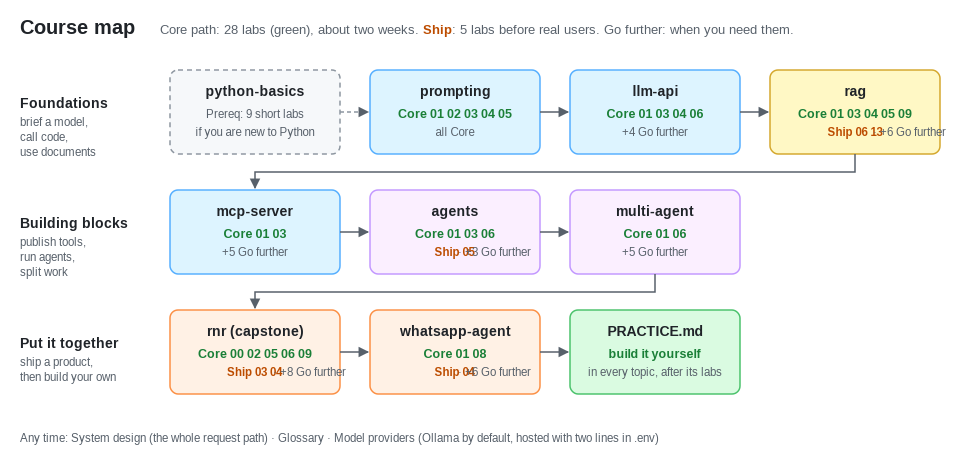
Core path
28 of the 80 labs: every building block once, end to end. At 45 minutes or less per lab that's under 21 hours, about two weeks at 1.5 hours a day. The Track column of each topic's files table marks the rest:
- Before you ship (6 labs): safety lessons. Skip them while learning, never before real users see what you built: rag 06 metadata filters (access control), rag 13 model-written SQL, agents 05 budgets and safe retries, rnr 03 injection and PII, rnr 04 fail closed, whatsapp-agent 04 money and stock in code, not the model.
- Go further (37 labs): when your work needs that pattern. The Use it when column tells you which one.
- Prereq: python-basics, if you're new to Python.
| Topic | Core labs | After it, you can |
|---|---|---|
| prompting | 01-05 (your first hour) | Brief a model, get data back instead of prose, score a prompt change |
| llm-api | 01 single call · 03 chained calls · 04 error handling · 06 human approval | Let a model call your code, safely |
| rag | 01 embeddings · 03 ingest and search · 04 basic RAG · 05 hybrid search · 09 evaluation | Answer from documents with citations, and measure it |
| mcp-server | 01 list capabilities · 03 Ollama host | Publish tools once and use them from any AI client |
| agents | 01 agent loop · 03 self-check · 06 pause and resume | Run a goal over many steps with checks and human approval |
| multi-agent | 01 RFQ pipeline · 06 single vs multi | Split work across agents, and know when not to |
| rnr | 00 generate data · 02 LLM moderation · 05 golden set eval · 06 traces · 09 cost meter | Ship a feature with guardrails, evals, tracing and a cost per request |
| whatsapp-agent | 01 chat loop · 08 extract then code | Put it all together in a real ordering flow |
All catalogs, prices, customers, reviews and costs in this repo are synthetic, made up for teaching. Acme Build is fictional. The course is written by engineers at JSW One, and none of it is JSW One business data.
Topics
Needs: the topics to do first. Each topic README repeats it, with what you can do after.
| Folder | Topic | Needs | What you learn | Guide | FAQ | Practice |
|---|---|---|---|---|---|---|
| python-basics | Python basics | Any programming language | First, if you're new to Python: just the features the labs use (dicts, functions, JSON, errors, Pydantic, async, the state and reducers under LangGraph) | Learn Python basics | FAQ | — |
| prompting | Prompting | Setup; Python | How to brief a model: messages and roles, instructions and few-shot examples, structured output, prompt versions scored on a golden set, and injection basics | Learn prompting | FAQ | Practice |
| llm-api | Tool calling | prompting | How a model asks your code to fetch stock, prices and credit, and how to make that safe | Learn tool calling | FAQ | Practice |
| rag | Retrieval-augmented generation | prompting (llm-api for lab 10) | How a model answers from your documents, with citations, filters and evaluation; PDF and Excel files; questions over a database (text-to-SQL) with guardrails | Learn RAG | FAQ | Practice |
| mcp-server | MCP servers | llm-api (rag for lab 07) | How to publish catalog tools once (an MCP server) and use them from any AI client (our host, Claude Desktop), with identity and approval | Learn MCP | FAQ | Practice |
| agents | Single agents | llm-api, mcp-server | How a model works through a goal (quote, credit, order) with budgets, retries, memory, answer checks and human approval that can pause and resume; then the same agent in LangGraph | Learn agents | FAQ | Practice |
| multi-agent | Multi-agent workflows | agents | How a team of small agents turns an RFQ into an approved quote: typed handoffs, a router, parallel line agents, a critic, one pause for the whole flow; single agent vs team, scored; then LangGraph | Learn multi-agent | FAQ | Practice |
| rnr | Capstone: reviews and ratings (guardrails, evals, tracing, cost, LLM-as-judge) | prompting (rag for optional lab 14) | A real product (API, SQLite, worker, HTMX UI) for B2B reviews. Main path: 9 labs that take review moderation to production with guardrails, evals, tracing, cost, a gateway and a calibrated judge. 6 optional labs add aspects, summaries and Q&A | Learn guardrails · Learn evals and LLM-as-judge · Learn to operate: tracing and cost | FAQ | Practice |
| whatsapp-agent | Applied: WhatsApp ordering agent | llm-api, agents | How Hinglish WhatsApp orders become a priced cart and a confirmed order: matching and units in code, a cart card with buttons, Confirm as idempotent code, credit policy, routing, evals, and a photo of a handwritten list read by a local vision model; with a WhatsApp-like web chat | Learn the WhatsApp agent | FAQ | Practice |
Evals, guardrails, observability and cost are taught inside the RnR capstone's main path (see the rnr labs table): guardrails in labs 02-04, evals in 05 and 13, tracing in 06, cost and the gateway in 09 and 11.
Reference
| Page | What it's for |
|---|---|
| AI basics | 30 minutes for freshers: what a model is, tokens, context, temperature, hallucination, and four calls to try |
| Skills ladder | What you can do at each level, fresher to architect, the labs for each, and the proof that a level is done |
| For architects | Three decisions across every topic: what goes into each call (context engineering), hand-rolled vs frameworks, and when to fine-tune |
| For leaders | A 2-hour track for managers and directors: what to ask, how to read an eval, why AI projects stall |
| System design | The whole request path in one diagram, a method to size an AI feature, and a worked example with tokens, ₹ and latency |
| Ship a lab | Serve a lab as an API: FastAPI, streaming, Docker, and user feedback that becomes golden-set cases |
| Model providers | Run the labs on Ollama, OpenAI, Anthropic, Gemini, Groq or OpenRouter: setup, keys, cost and data rules |
| The model door | The one interface every topic uses to call a model, and how LLM_MODEL switches provider |
| OWASP LLM Top 10 map | The industry's ten LLM security risks, with the labs that defend against each and the gaps; for security reviews |
| Glossary | Every term from design reviews in one line, with who needs it and where to see it in code |
How each topic is organised
README.md: the entry point: what you'll be able to do, setup, the file list (Track, Time) and rules of thumb.learn-<topic>.md: a short learning guide with SVG diagrams (indiagrams/): what the topic is and why, the mental model in code, the labs in stages, key decisions, gaps to production and advanced topics to explore next. Every new topic gets one.- A shared module or a small package (
rag.py,host.py,agent/, ...) with the reusable code. Each lab's docstring names the functions to read first; files marked plumbing can be skipped. - Numbered example scripts, one pattern each, each small enough to read and run in 45 minutes or less. The README's
Track column marks each one Core (on the Core path), Before you ship or Go further. Each ends with an Expected output and What can go wrong block. The docstring's
Time:line and the README's Time column give the default run on qwen3:8b on a 16 GB Mac; slow options (full eval sets,--llmdata) are opt-in flags. FAQ.md: questions from learning the topic plus common ones, with short answers and pointers to the code. In rag and rnr, the long tail (run stories, smaller details) is inFAQ-more.md.- Model-free tests (
pytest -q) for the shared code. requirements.txtwith that topic's packages.
Every lab also runs end to end on a fake model in CI (python smoke_labs.py), and LABS-VERIFIED.md
says when each one last ran on a real model. A lab's Expected output is from the run its block names; models drift, so yours may differ.
Setup
See INSTALL.md; the short version is step 1 of Start here. Run python check_setup.py
from this folder any time a lab fails to start: it checks Python, the venv, packages, Ollama and the models, and prints the fix.
Models
| Model | Used for | Size |
|---|---|---|
qwen3:8b |
Chat, tool calling, answers | about 5 GB |
nomic-embed-text |
Embeddings for RAG | about 270 MB |
qwen3-vl:8b-instruct |
Whatsapp-agent lab 09 only: reads the photo and does the text steps, so one model is loaded | about 6 GB |
Every topic calls the model through door/, so one setting switches all of them: LLM_MODEL for chat
(another Ollama model such as ollama/qwen3:14b, or a hosted one such as openai/gpt-5.4-mini) and EMBED_MODEL
for embeddings (VISION_MODEL for photos), set in .env (copy .env.example). Setup per provider, keys, cost and data rules:
| Local | Hosted |
|---|---|
| Ollama (default) | OpenAI · Anthropic · Gemini · Groq · OpenRouter |
Start with providers/README.md: which one to pick, and the rules that apply to all of them.
Support, contributing and license
Support. The course is maintained by a small team of engineers at JSW One, on a best-effort basis. Stuck on a lab?
Run python check_setup.py, read the lab's What can go wrong block and the topic's FAQ, then open a
Bug in a lab issue with the command, the output and your setup.
We aim to reply within a week. We can't help with your own projects or other courses.
Issues and small PRs are welcome: see CONTRIBUTING.md and the code of conduct. Security problems go privately: see SECURITY.md. Every push runs the model-free tests of each topic in GitHub Actions; no model or key is needed for them. Code and course material are released under the MIT License.