Learn LLM tool calling
A short guide to read before (or alongside) the labs. The README has setup, the file list and rules of thumb. This page explains how the pieces fit, which decisions matter, and where to go deeper.
1. What tool calling is, and why it exists
An LLM can only produce text. Tool calling lets it ask your code to do things: look up stock, calculate a price, place an order. You describe your functions to the model; when it needs one, it replies with a structured request, such as get_stock(sku="BOLT-M8-40"), instead of an answer. Your code runs it and sends the result back.
The problem it solves: the model doesn't know today's stock, this customer's price or their credit limit, and it can't change anything in your systems. Before tool calling, teams asked the model to "reply with ACTION: ..." and parsed the text with regex, which broke often. Models are now trained to return tool calls in a fixed, schema-checked shape.
Analogy: the model is a smart new manager with no system access. They can't log into the ERP, so they write a request slip: "check stock of BOLT-M8-40". Your staff (your code) check the slip is allowed, do the work and hand back the answer. The manager never touches the system.
Tools come in three kinds, with different risk:
| Kind | Example | Rule |
|---|---|---|
| Read | get_stock, search_products |
Run freely; validate the arguments |
| Compute | get_price, create_quote |
Do the maths in code, never in the model |
| Act | place_order |
Bind identity in code and ask a human first |
When you need it: live data, exact calculations, or actions. For explaining documents use RAG (../rag); to pull typed fields out of text use structured output (../prompting, lab 03). Tool calling is also the building block for agents and MCP servers (an MCP server is a standard way to publish tools).
2. The mental model
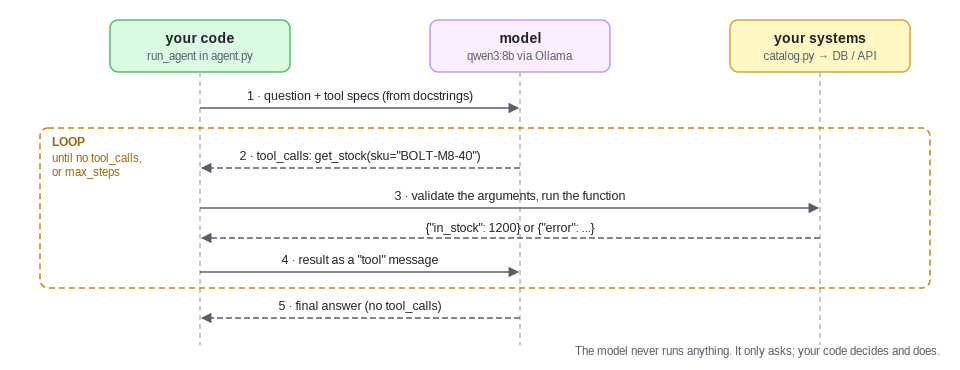
Three parties, and only one of them does anything.
- The model reads the question and the tool descriptions, then either answers or asks for a tool call: a name plus arguments.
- Your code decides whether to honour that request, runs the function, and sends the result back as a
toolmessage. - Your systems (catalog, ERP, credit) hold the facts and do the work.
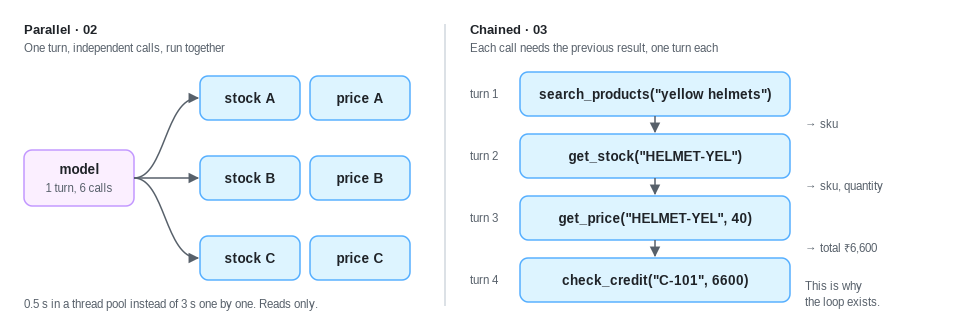
Analogy: the loop is that manager working through an assistant over chat. They ask for one report, read it, then ask for the next one based on what they saw, until they can answer. That's why chained calls (03) need several turns.
The one idea to hold on to: the model never runs anything; it only asks. Every safety, correctness and cost control lives in the code between the model's request and your systems. That makes tool calling an integration problem as much as an AI problem, and your existing API discipline applies.
In code (one round trip):
import door

def get_stock(sku: str) -> dict:
    """Get units in stock for a product SKU.

    Args:
        sku: Product SKU, for example BOLT-M8-40
    """
    return {"sku": sku, "in_stock": 1200}

messages = [{"role": "user", "content": "Stock of BOLT-M8-40?"}]
reply = door.chat(messages, tools=[get_stock])               # the model asks for a tool

call = reply.tool_calls[0]
result = get_stock(**call.args)                              # your code runs it

messages += [reply.message(), door.tool_result(call, result)]
print(door.chat(messages).text)                              # the model answers
door is the repo's one door to the model (../door/): Ollama with qwen3:8b by default, any hosted provider with LLM_MODEL (see Model providers). The door builds the tool schema from the function name, type hints and docstring, so those are what the model reads. 01_single_call.py is this same flow with more printing, and tools.py adds the loop.
3. The labs in three stages
Stage 1: the loop (tools.py, 01–03)
| Script | What you see | Key takeaway |
|---|---|---|
tools.py |
The loop written out step by step | An "agent" is just this loop with a step cap |
01_single_call.py |
One raw request and response, no loop | The model returns a request, not a result |
02_parallel_calls.py |
Six independent calls: 3 s one by one, 0.5 s together | Parallelise slow reads; never writes without thinking about order |
03_chained_calls.py |
Search → stock → price → credit, one turn each | The model can't plan steps that depend on data it hasn't seen. That is why the loop exists |
Stage 2: making it safe (04–06)
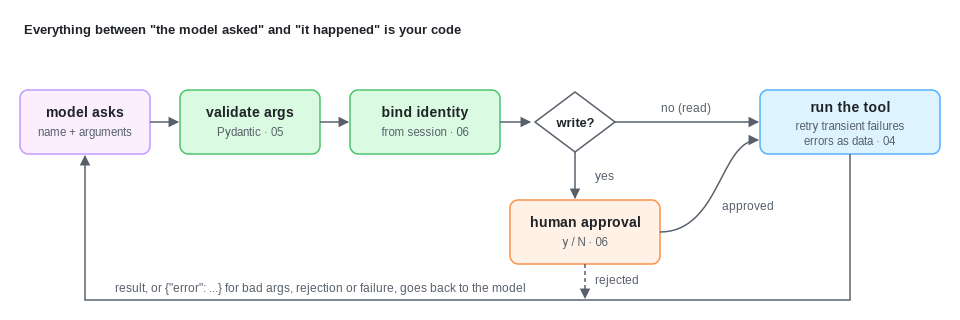
Read the diagram left to right. Each box is code you own:
- 05 Validate arguments. Auto-generated schemas cover simple arguments. For nested input (a quote with line items) write the schema and validate with Pydantic. Bad output becomes an error message, not a bad row in your database.
- 06 Bind identity, gate writes.
customer_idcomes from the login session, soplace_orderdoesn't even show it to the model. Reads run freely; writes wait for a human "yes". - 04 Errors as data. Return
{"error": ...}instead of raising, so the model can explain or recover. Retry transient failures, and cap the loop withmax_steps.
Stage 3: scale and user experience (07, 08)
- 07 Routing. Small models get confused past roughly 8 to 10 tools. One cheap call classifies the intent, and the second call sees only the tools for that intent. Guard against a wrong route with overlapping tool sets and an "unsure" fallback.
- 08 Streaming. Text streams token by token, but tool calls arrive whole. Collect them, run them, then stream the next turn.
- Not a tool at all. When you only need typed data out of messy text, structured output (
schema=,../prompting/03) has fewer moving parts than a tool.
4. Decisions your team will face
| Decision | Start with | Change when |
|---|---|---|
| Tool schema | Auto-generated from the function signature and docstring | Arguments are nested or need constraints: hand-written schema plus Pydantic (05) |
| Tool description | One-line purpose, Args: with examples, what it is not for |
Never skip this. The docstring is the prompt for tool choice |
| Number of tools | All tools in one call | More than about 8 to 10, or a small model picks wrongly: route first (07) |
| Execution | Sequential | The model asks for several independent, slow reads in one turn (02) |
| Write actions | Human approval for every write | Only auto-approve low-risk writes that are idempotent and fully logged |
| Identity and tenancy | From the session, inside your code | Never. The model must not fill in who it acts for |
| Calculations | Inside tools (totals, discounts, credit) | Never trust the model's arithmetic for money |
| Tool call vs structured output | Tool call when the model must fetch or act | You only need typed data from text: schema= (../prompting/03) |
5. What the labs don't cover
The labs use a fake catalog and one user at a terminal. Production adds:
- Idempotency. Models and networks retry. A second
place_ordermust return the first order, not create a new one. - Prompt injection through tool output. Supplier emails or product descriptions can carry instructions. Treat every tool result as data.
- Large results. Cap, paginate or summarise before a tool returns thousands of rows into the context window.
- Evaluation. A fixed set of questions with the expected tool calls and arguments, run after every prompt, model or tool change.
- Tracing and audit. Log every request, argument, result and approval, so you can debug a wrong answer and show who approved an order.
- Multi-turn memory and cost. Keeping and trimming chat history, and the token cost of sending many tool schemas on every call.
Check yourself
Answer each in a sentence or two, without looking. If one is hard, reread the section in brackets.
- The model never runs anything; it only asks. What does that mean for where your safety checks must live? (section 2)
- Why can the model ask for six stock checks in one turn, but not for search, stock, price and credit together? (section 3, labs 02 and 03)
- What could go wrong if
place_ordertook acustomer_idargument that the model fills in? (section 3, lab 06) - A tool raises an exception when the SKU is unknown. What is wrong with that design? (section 3, lab 04)
- The Acme Build assistant now has 25 tools and qwen3:8b keeps picking the wrong one. A teammate suggests a longer system prompt. What would you do instead, and why? (section 3, lab 07)
Same pattern, other industries
The labs use a B2B catalog, but the pattern carries across domains. What changes is the tools and the rules around them.
| Industry | Use case | What changes |
|---|---|---|
| E-commerce (B2C) | Order tracking and returns assistant (get_order_status, create_return) |
Return eligibility is policy: check it in code, not by the model. Customer identity comes from the login |
| Banking | Balance and transaction queries, blocking a lost card | Strict identity binding and full audit logs. Blocking a card is a write: confirm with OTP, not just a chat "yes" |
| Insurance | Claim status and premium quotes | Premiums come from the rating engine inside a tool, never the model's arithmetic. A quote chains several lookups |
| Manufacturing | Maintenance assistant reads machine sensor data and raises work orders in the maintenance system | Sensor data is large: aggregate inside the tool. Work orders are writes and need approval |
Going deeper: advanced tool-calling topics
Once the labs make sense, these are the topics worth searching for. Each one fixes a specific weakness of the basic loop.
| Topic | What it solves | Search for |
|---|---|---|
| Forced tool choice | The model answers from memory instead of calling the tool | "tool_choice", "forced function calling" |
| Constrained decoding | Malformed JSON or arguments from small models | "constrained decoding JSON schema", "grammar-based sampling" |
| Tool retrieval | Hundreds of tools don't fit in one prompt | "tool retrieval", "dynamic tool selection", "tool search" |
| Code as actions | Many small calls where one script would do | "CodeAct", "programmatic tool calling" |
| Indirect prompt injection defences | Tool output that tries to steer the model | "indirect prompt injection", "dual LLM pattern", "CaMeL" |
| Safe write actions | Retries, partial failures, multi-step orders | "idempotency keys", "saga pattern" |
| Tool-use evaluation | Knowing whether a prompt or model change broke tool choice | "Berkeley Function Calling Leaderboard", "tool use evaluation" |
| Tracing | Seeing why the agent did what it did | "OpenTelemetry GenAI semantic conventions", "LLM tracing" |
| Human-in-the-loop patterns | Approvals that survive restarts and run async | "human in the loop agent interrupt", "durable execution agents" |
| Prompt caching | Paying again for the same system prompt and tool schemas | "prompt caching" |
Before moving on, try these: the exercises in PRACTICE.md: an idempotency key for place_order, a cancel_order write tool, measuring tool choice before and after a docstring change, then build delivery slot booking yourself.
Next topic: RAG. Its example 10 reuses run_agent from here, with document search as one more tool.