Learn the WhatsApp ordering agent
A short guide to read before (or alongside) the labs. The README has setup, the file list and rules of thumb. This page explains how the pieces fit, which decisions matter, and where to go deeper.
1. What it is, and why it exists
A WhatsApp ordering agent sits behind a business number and turns a store owner's message ("50 bag Kiran PPC aur 20 sariya 8mm bhej do") into a priced cart the owner confirms with one tap.
The problem it solves is the gap between how remote store owners talk and how order systems work. Owners already use WhatsApp all day. They won't learn an app, and a menu bot ("press 1 for cement") breaks on the first "same as last time, 10 bag extra". An agent reads the message as written, uses tools to find products and prices, and asks when it isn't sure.
Analogy: the distributor's trusted order-taker on the phone. He understands "sariya" and "bori", knows the store's last order, checks the ledger before promising credit, reads the order back, and books it only when the owner says "haan". He doesn't decide prices; the rate card does.
When you need one: when customers order in free text, in their own words, and the order depends on catalog, stock and credit. When the order is always the same few items, a menu or a reorder link is cheaper. Order status, balance and payment links are often one tool call each: a router plus a small agent, or plain code, is enough (lab 06). Complaints go to a person.
2. The mental model
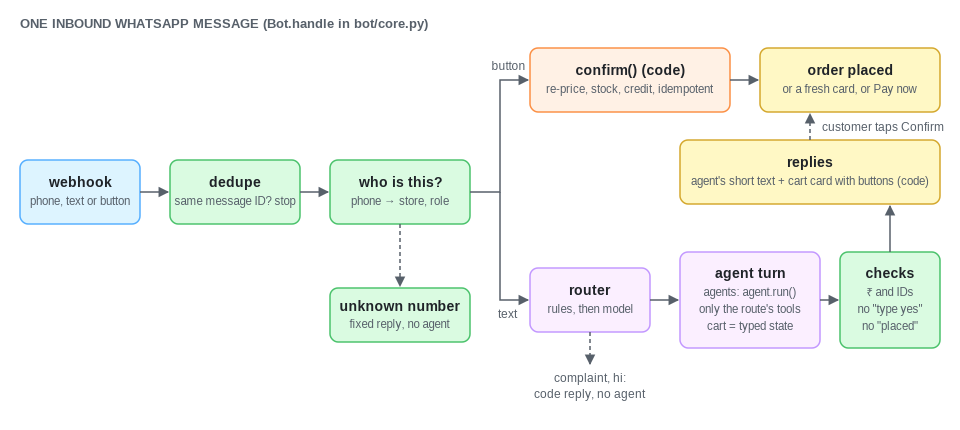
Three parts:
- The channel (
Bot.handle): dedupe, identity from the phone, buttons vs text. No model. - The agent turn: the agents topic's
agent.run()with tools bound to this customer's session. It builds the cart and asks for confirmation. It can't place orders. - The commit (
confirm()): plain code behind the Confirm button.
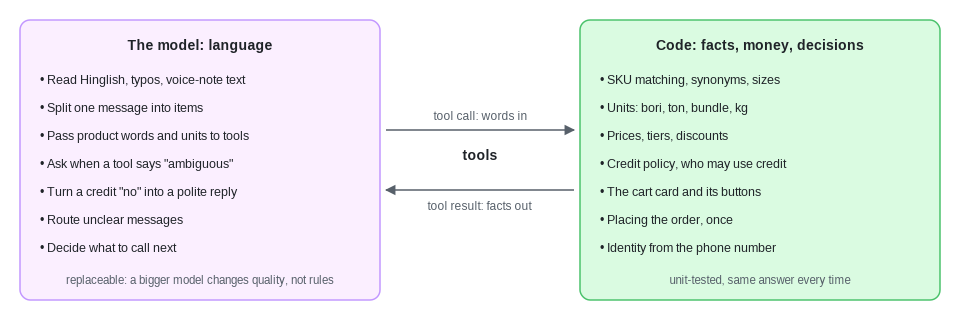
The one idea to hold on to: the agent proposes, code decides. The first real run added a corollary: anything the model only has to remember to do, it will sometimes forget, so code does it. The model is great at understanding "10 aur badha do" and terrible at being the system of record. Give it words-in, facts-out tools, and keep every decision about money in code you can test.
In code: one message, end to end (01_chat_loop.py):
from bot import Bot, Inbound

b = Bot()                                                    # route=True adds the router (06)
outs = await b.handle(Inbound("+919800000001", "50 bag Kiran PPC aur 20 sariya 8mm"))
print(outs[0].text)                                          # the agent's short reply
print(outs[1].text, outs[1].buttons)                         # the cart card, rendered by code
outs = await b.handle(Inbound("+919800000001", button=outs[1].buttons[0][0]))   # tap Confirm: no model call
3. The labs in four stages
Stage 1: from message to cart (01–03)
| Script | What you see | Key takeaway |
|---|---|---|
01_chat_loop.py |
A Hinglish order becomes a cart, a card with buttons, then an order on Confirm | The agent's output is a cart, not an order |
02_sku_matching.py |
Matching and units in code (no model), then the agent asking on "Kiran cement" | Ambiguity is data from a tool; asking beats guessing |
03_memory_and_reorder.py |
"Same as last time", add vs set, "kitna hua?", a reply after a restart | The cart is typed state in the prompt, saved per phone |
Stage 2: making it safe to commit (04–05)
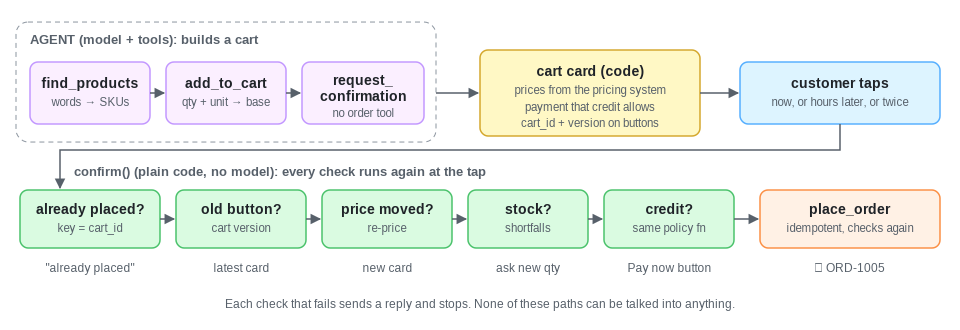
- 04 Confirm in code. No model. Double taps, the same webhook twice, an old button, a price revision and a stock drop, each handled by a check that runs at the tap.
- 05 Credit and payment. Four phones send the same "credit pe bhej do". One policy function decides; the agent explains it; the card, the button and the backend enforce it.
Stage 3: many kinds of message, measuring, and a simpler design (06–08)
- 06 Routing and handoff. Rules route order IDs, "best rate", "phata hua" and "hi" for free; a model routes the rest. Each route gets 3 tools instead of 11. Complaints go to a person. An injection attempt changes nothing.
- 07 Evals. 17 messy messages with expected carts, scored in code by tag. The first real run scored 4/15, and 8 of the failures were one bug: the model said "tap Confirm" and never sent the buttons. After fixes in code (not in the prompt) it scored 12/15.
- 08 Extract, then code. One structured-output call turns the message into typed lines; code runs the same tools in order, replies from templates and sends the card. The agent is the fallback. On the real run: extract 15/15 with 1 model call and 3.0s per message; agent 12/15 with 2.4 calls and 8.9s.
Stage 4: orders as photos (09)
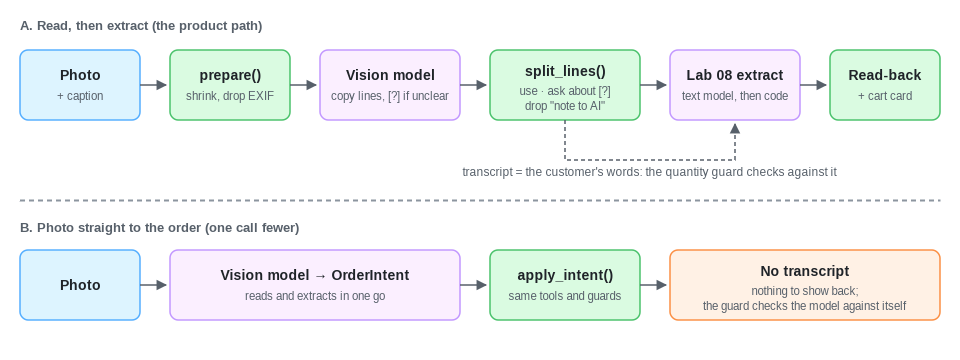
- 09 Photo to cart. The munshi photographs a handwritten list. A local vision model (qwen3-vl:8b-instruct, which also does the text steps, so one model is loaded) first only copies the note to text; code asks about [?] lines and drops lines written to the AI; lab 08 runs on the rest, unchanged. Compared with one vision call straight to the order: one call fewer, but nothing to read back and nothing for the quantity guard to check. Real run: after two code fixes for a crossed-out line (the model first copied it, then filed it in the wrong field), both designs scored 7/7; direct was faster (5.0s vs 7.2s per photo), but only the read design can show the customer what it read. The photos are clean synthetic renders, so treat the scores as a ceiling.
4. Decisions your team will face
| Decision | Start with | Change when |
|---|---|---|
| Who places the order | The customer's button, running code | Never the model. Repeat orders on a schedule can skip the chat, not the code |
| Agent loop or extraction | Extract-then-code for order lines; a read-only agent for the question part; full agent as fallback | Messages get open-ended (questions, negotiation): more of the agent |
| Eval robustness | Reworded and mid-chat cases at temperature 0 | Before a launch: a run at temperature 0.7 to find fragile cases |
| Model arguments | Pass the customer's words; guard numbers in code | Never trust a number the customer didn't say |
| Confirmation | Reply buttons with cart ID and version | More than 3 options: a list message. Big orders: add a call from sales |
| SKU matching | Synonyms and fuzzy matching in code | Catalog passes a few hundred SKUs: add RAG over descriptions, mine aliases from chats |
| Units | Conversions in code per SKU | Weight-priced items (TMT by the ton): price by weight in the backend, show both |
| Credit | One policy function with reason and options | New rules (cheque bounce, holds): extend the function, not the prompt |
| Routing | Rules, then one model call | Message mix grows: train a small classifier on logged, labelled messages |
| Tools per turn | Only the route's tools, enforced in call() |
Mixed messages are common: give the order route read-only account tools too |
| Session state | A file per phone | Production: Redis or a database row per phone, with expiry and a lock per phone |
| Photos | One vision model transcribes, then runs the text path; read the transcript back | Measured on your real photos, direct-to-order is as accurate: save the call, keep the read-back |
| Model | Local qwen3:8b for learning | Real customers: a hosted model for speed and Hinglish quality, same tools and checks |
| Quality gate | Golden set scored in code | Tone and language matter: add an LLM judge, measured against labelled chats |
5. What the labs don't cover
- The real WhatsApp Cloud API. Webhook verification, signature checks, the 24-hour customer-service window (outside it you can only send approved templates), template approval, rate limits, and the send-message API.
- Voice notes. Owners send voice notes too. Same move as lab 09: speech-to-text in front of the same text path, a read-back, the tools unchanged.
- Real phone photos. Lab 09's notes are clean renders. Real ones are tilted, shadowed, blurred, on ruled paper, in Devanagari or mixed scripts. Collect a few dozen (with consent) and score them before trusting the numbers.
- Async processing. Webhooks need a fast 200; the agent should run on a queue and reply when done, with a typing indicator meanwhile.
- Real backends. Catalog search, pricing, ERP orders, credit from finance, payment links with callbacks that release the order.
- Concurrency. Two messages from the same phone at once, two staff confirming the same cart: a lock per phone and a unique key on orders.
- Observability and cost. A trace per message, cost per order, alerts on stopped turns and handoffs.
- Languages beyond Hinglish. Marathi, Tamil, Telugu, Bengali: the matching tables and the evals need entries per language.
Check yourself
Answer each in a sentence or two, without looking. If one is hard, reread the section in brackets.
- Why can't the agent place the order itself, even when the owner clearly says "haan, bhej do"? (section 2)
- An owner taps Confirm on yesterday's cart card, and the price has changed since. Why does confirm() check again at the tap instead of trusting the card? (section 3, lab 04)
- In lab 07, many failures came from the model saying "tap Confirm" without sending the buttons. Why was the fix made in code and not in the prompt? (section 2, lab 07)
- A teammate wants every route to get all 11 tools "so the agent is never stuck". Would you agree? Why? (section 3, lab 06)
- In lab 09 the direct photo-to-order design was faster with the same score. Why might you still choose the design that copies the note to text first? (section 3, lab 09)
Same pattern, other industries
The shape is the same wherever orders arrive as chat: an agent understands and builds a draft, code prices and commits, the customer confirms with a button.
| Industry | Use case | What changes |
|---|---|---|
| FMCG distribution | Kirana stores reorder biscuits, oil and soap on WhatsApp | Thousands of SKUs and schemes ("buy 10 get 1"): schemes are code; beat plans decide delivery days |
| Pharma distribution | Chemists order medicines by brand or salt name | Matching by salt and strength must be exact; substitutions need the chemist's explicit yes |
| Agri inputs | Farmers order seeds, fertiliser, pesticide | Voice notes in local languages; dose and crop advice goes to an agronomist, not the bot |
| Restaurants (B2C) | Table or delivery orders over WhatsApp | Menu options and add-ons; payment before kitchen; peak-hour latency matters |
| Auto spare parts | Garages order parts by vehicle model | Fitment lookup (model, year, variant) is code; photos of the old part help matching |
Going deeper: advanced topics
| Topic | What it solves | Search for |
|---|---|---|
| WhatsApp Cloud API and Flows | Real webhooks, templates, forms inside WhatsApp | "WhatsApp Cloud API webhooks", "WhatsApp Flows", "interactive reply buttons" |
| Indic language understanding | Hinglish and regional languages, transliteration | "Hinglish NLP", "IndicTrans2", "AI4Bharat", "code-mixed text" |
| Document AI and OCR | Messy photos, tables, invoices, mixed scripts | "Qwen3-VL OCR", "document understanding VLM", "handwriting recognition Indic", "image preprocessing deskew" |
| Speech-to-text for voice notes | Orders sent as voice | "Whisper Hindi", "IndicWhisper", "Bhashini ASR" |
| Product matching at scale | Thousands of SKUs and messy names | "entity resolution product matching", "hybrid search SKU", "query rewriting e-commerce" |
| Idempotency and exactly-once | Double taps, retries, two servers | "idempotency keys API design", "outbox pattern", "exactly-once webhook processing" |
| Conversation state stores | Sessions per phone across servers | "Redis session store", "per-key locking", "conversation state machine" |
| Proactive and scheduled messages | Reorder nudges, payment reminders | "WhatsApp message templates", "reorder prediction", "customer-service window" |
| Conversational commerce evals | Measuring cart accuracy and tone | "task-oriented dialogue evaluation", "LLM-as-judge rubric", "golden dataset" |
Before moving on, try this: add a "partial stock" rule to confirm(): when stock is short, offer a button "Order available qty" that places the order for what's in stock. Write model-free tests in test_bot.py for both buttons, then try it in the web chat with 25 bars of 12mm sariya (only 30 in stock, so set STOCK_SEED to 10 first).
Then practise: the exercises in PRACTICE.md: a new region measured, minimum order and delivery day, a temperature run to find fragile cases, then build damaged-delivery claims yourself.
Next topic: evals, guardrails, cost and observability, taught inside the RnR capstone. Add golden.json from this lab to that test suite.