Learn Python basics (for the AI labs)
A short guide to read before the scripts. The README has the file list. This page explains why these few features, and not others, are the ones that matter for AI work.
1. What this is, and why it exists
This is the minimum Python needed to follow the AI labs: the features their code actually uses, found by scanning it, and nothing more. No Python tour, no algorithms, no web frameworks.
The problem it solves: someone strong in Java, Go or JavaScript opens agent.py and gets stuck on fn(**call.args) or async with Client(...), not on the AI idea. Ten minutes on syntax hides the one line that matters.
Analogy: this is the driving test, not mechanic school. You learn the controls you touch on every trip (steering, brakes, mirrors), not how the gearbox is built.
When you need it: if you have not written Python in the last year. If you have, skim the README's file table and move on.
How to use it: read a script top to bottom, run it, compare with the Expected output block at the end, then change something and run it again. About 2–3 hours if you know another language.
2. The mental model
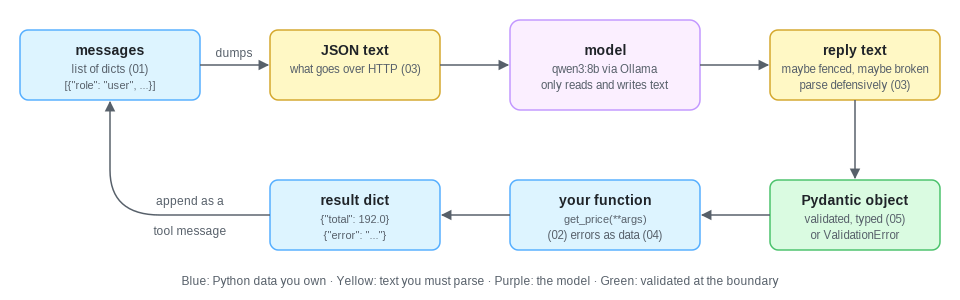
AI application code is a loop of converting data at the boundary with the model:
- What you own is Python data: dicts, lists, typed objects.
- What crosses the wire is text. The model reads text and writes text, nothing else.
- Every bug worth worrying about sits at a conversion: dict to JSON, reply text to dict, dict to typed object, arguments into your function.
Analogy: customs at an airport. Inside the country (your code), you trust what has been checked. Everything arriving (model output) is inspected at the border (parsing and Pydantic) before it gets in. Your code also never lets the model fill in the duty amount: arithmetic and rules stay on your side.
The one idea to hold on to: the model sends you text, never data. Data is what you get after you have parsed and validated it.
In code: the one line that connects everything.
# The one line that connects everything: the model asks for a tool, your code calls it.
tool_call = {"name": "get_price", "arguments": {"sku": "BOLT-M8-40", "quantity": 60}}
result = TOOLS[tool_call["name"]](**tool_call["arguments"])   # dict lookup + ** unpacking
If you can explain that line, you're ready for prompting and llm-api. Scripts 01 and 02 get you there.
3. The scripts in three stages
Stage 1: read any lab file (01–02)
| Script | What you see | Key takeaway |
|---|---|---|
01_data_shapes.py |
Messages and catalog rows as lists of dicts; filter and reshape them | .get() for anything optional; comprehensions are just compact loops |
02_functions.py |
A tool function, called directly, from a model-style {"name", "arguments"} dict and through a registering decorator |
The docstring and type hints are what the model reads; **args is how it gets called; @tool just files the function |
Stage 2: handle what the model sends back (03–05)
| Script | What you see | Key takeaway |
|---|---|---|
03_json.py |
Clean, fenced, <think>-wrapped and broken model replies |
Parse defensively, or constrain output with a schema |
04_errors_and_retries.py |
Specific exceptions, a business error, a retry decorator | Retry only transient errors; return errors as data |
05_classes_and_pydantic.py |
@dataclass records, Pydantic validation errors, a JSON schema |
Validate at the boundary, then trust the typed object |
Stage 3: wiring, waiting and graphs (06–09)
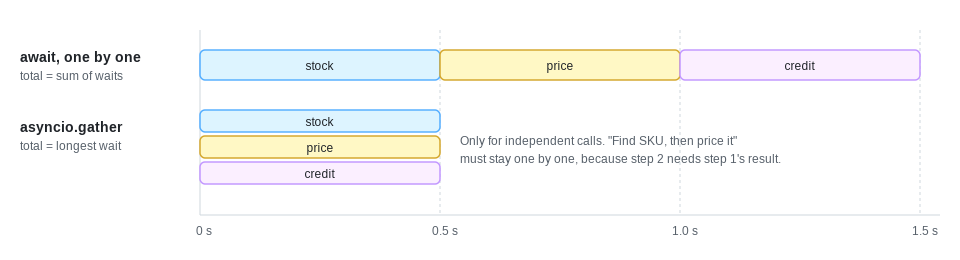
- 06 Async. The same three lookups take 1.5 s one by one and 0.5 s with
gather. MCP clients are async, soasync withandawaitappear in every MCP script. - 07 Scripts. How a lab script finds its files, reads a question and flags from the command line, pulls SKU codes out of text with a regex, asks SQLite with
?parameters and prints a streamed reply with a generator. - 08 State and graphs. The Python under LangGraph: a
TypedDictstate, a reducer that appends instead of replacing, nodes that return only what they change, and closures that build nodes. A graph runner in 8 lines, then the same nodes in LangGraph give the same result. - 09 Together. A buyer's email becomes a validated, priced order, with one model call. The model extracts; your code prices and checks credit.
4. Decisions your team will face
| Decision | Start with | Change when |
|---|---|---|
| Records inside your code | Plain dicts in prototypes | Data crosses a function boundary more than once: @dataclass, or Pydantic if it came from outside |
| Validating model output | Pydantic model_validate on every reply and tool argument |
Never skip it; tighten Field limits instead |
| Getting JSON from a model | Schema-constrained output (schema= in door.chat) |
The model or API has no schema mode: fall back to parse_model_json and a retry |
| Sync or async | Sync for scripts and batch jobs | You call several tools at once, run a server, or use an async SDK (MCP) |
| Hand-written loop or LangGraph | A plain loop (agents/agent/loop.py) while you learn |
You need pause and resume, durable checkpoints or branching flows (agents/07_langgraph.py) |
| Python version | 3.14 (what the labs are tested with) | A server or base image pins another version: test the labs you use on it |
5. What the scripts don't cover
On purpose, because the labs don't need them:
- Packaging and project layout.
pyproject.toml, publishing packages, monorepos. - Production code quality. Logging, configuration, linting (
ruff) and strict type checking (mypy,pyright). - Data libraries. pandas, numpy. RAG uses them indirectly through Chroma; you never call them.
- Web frameworks. FastAPI is how you would put these labs behind an API; it builds on the Pydantic and async you learn here.
- Deeper language features. Writing your own decorators and context managers, metaclasses,
__slots__, typing generics.
Check yourself
Answer each in a sentence or two, without looking. If one is hard, reread the section in brackets.
- Why does this guide say the model sends you text, never data? What has to happen before you can trust it? (section 2)
- A model reply contains
"quantity": "fifty". What happens if your code skips validation and passes it on? (section 3, lab 05) - Why should a retry decorator retry a timeout but not an "unknown SKU" error? (section 3, lab 04)
- Three lookups take 0.5 s each. When does
gathermake them faster, and when would it be wrong to use it? (section 3, lab 06) - A teammate wants the model to work out the order total in lab 09, to save writing a pricing function. Would you agree? Why? (section 2, lab 09)
Same pattern, other industries
The Python stays the same in every domain; only the shape of the records changes.
| Industry | Use case | What changes |
|---|---|---|
| Banking | Extract fields from a loan application email | Decimal instead of float for money; stricter Field rules (PAN format, amount ranges) |
| Insurance | Turn a claim description into a structured claim | Nested models (claimant, incident, items), with dates validated and parsed |
| Logistics | Track shipments across carrier APIs | Many slow external calls, so async and gather become the default |
| Healthcare | Summarise discharge notes into a template | Validation must reject, not guess; log every failed parse for human review |
Going deeper: advanced Python topics
| Topic | What it solves | Search for |
|---|---|---|
| Pydantic validators | Rules across fields ("delivery date after order date") | "pydantic field_validator model_validator" |
Decimal for money |
0.1 + 0.2 != 0.3 in price totals |
"python decimal money rounding" |
| Structured concurrency | Cancelling sibling calls when one fails | "asyncio TaskGroup", "anyio" |
| FastAPI | Serving an agent or RAG pipeline as an API | "FastAPI pydantic async tutorial" |
| Type checking | Catching wrong types before you run | "mypy strict", "pyright" |
| Logging and tracing | Seeing what each model and tool call did | "python logging structlog", "OpenTelemetry python" |
Before moving on, try this: in 09_putting_it_together.py, change the email to ask for 600 bolts and a SKU that does not exist. Predict the output before you run it, then add a test for that case in test_basics.py without calling the model.
Next topic: prompting. Its labs call a real model for the first time and parse its answer into a Pydantic record, as 09_putting_it_together.py does.