Learn MCP servers
A short guide to read before (or alongside) the labs. The README has setup, the file list and rules of thumb. This page explains how the pieces fit, which decisions matter, and where to go deeper.
1. What MCP is, and why it exists
MCP (Model Context Protocol) is an open standard for connecting AI applications to tools and data. Anthropic introduced it in late 2024, and most AI clients and IDEs now support it.
The problem it solves is integration sprawl. In ../llm-api, the tools live inside one app. If the website chat, the sales copilot and an engineer's IDE all need stock and prices, each team writes its own integration to the catalog. Five AI apps and four systems means twenty integrations, each with its own bugs and security gaps. With MCP, each system publishes one server, every AI app speaks one protocol, and twenty integrations become nine pieces.
Analogy: MCP is USB-C for AI apps. Before USB, every printer needed its own cable and driver for every computer. Now a device implements the port once and works with any laptop. Closer to home: it's like asking every seller on a marketplace to publish one catalog feed in a standard format, instead of building a custom integration for each seller.
A server can offer three kinds of things:
| Capability | Who uses it | B2B example |
|---|---|---|
| Tools | The model decides to call them | get_price, check_credit, place_order |
| Resources | The app reads them as context | The customer's price list, return policy |
| Prompts | The user picks them, like a template | "Turn this RFQ email into a quote" |
Two more wins: clear ownership (the orders team owns the orders server; the AI team owns the host) and language-neutral pieces, since only JSON-RPC crosses the line (see the FAQ).
When you need it: when the same tools serve more than one AI app, or another team owns the system. For one app calling its own functions, plain tool calling is simpler.
2. The mental model
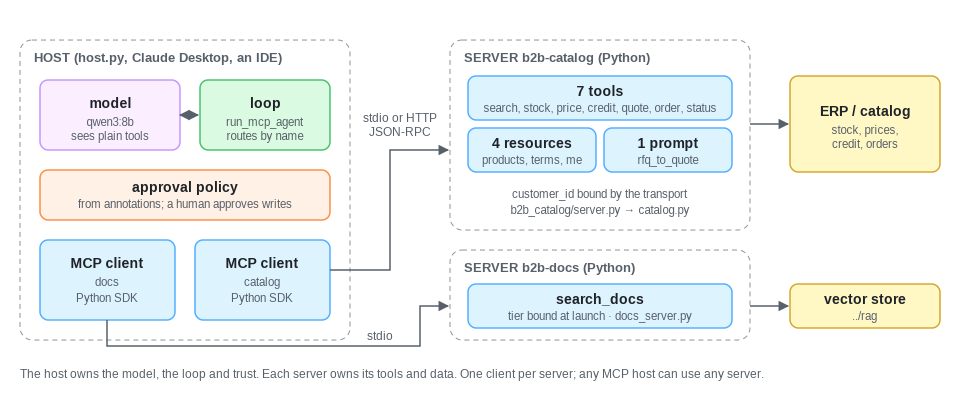
MCP splits the tool-calling app from ../llm-api into two parts that talk over a protocol.
- The host owns the model, the loop, and every trust decision: which servers to connect, who the user is, what needs approval.
- Each server owns a set of tools, resources and prompts, and the system behind them. It knows nothing about the model.
- Between them, one client per server speaks JSON-RPC over stdio (local child process) or Streamable HTTP (shared service).
Analogy: the host is a hotel concierge, with the model as its brain. A guest (the user) asks for something; the concierge decides which service to call: the restaurant, the taxi desk, the spa (the servers). Each service has its own menu (tools) and doesn't need to know which concierge is calling. The concierge checks the guest's room key (identity) and asks before charging the room (approval).
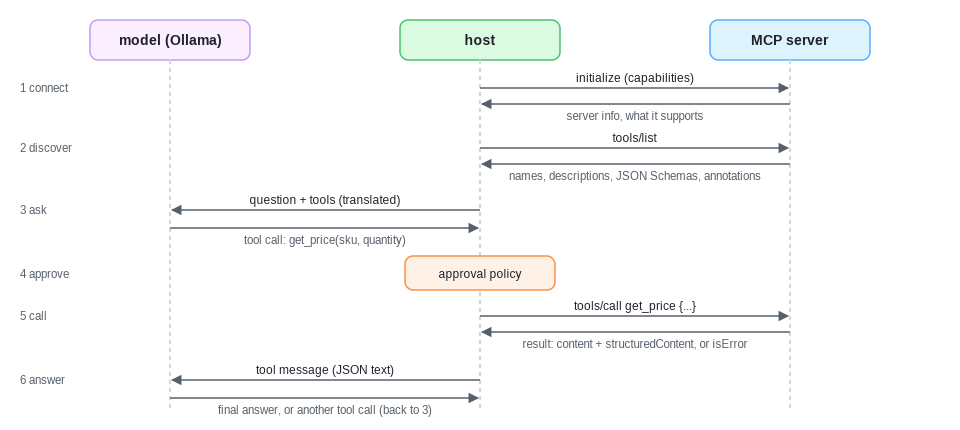
The one idea to hold on to: MCP changes who owns the tools, not how the model uses them. The model still sees a list of tools and asks for one. Everything you learned about descriptions, validation and small tool lists still applies. What changes is that the orders team can ship a server once, and every AI client in the company can use it.
In code: a tool on the server (b2b_catalog/server.py). The SDK builds the JSON Schema from the type hints and the description from the docstring:
mcp = MCPServer("b2b-catalog")

@mcp.tool(annotations=ToolAnnotations(read_only_hint=True))
def get_stock(sku: Annotated[str, Field(description="Product SKU, for example BOLT-M8-40")]) -> dict[str, Any]:
    """Get units currently in stock for a product SKU."""
    return ok(cat.get_stock(sku))       # ok() raises ToolError on {"error": ...}: the model reads it, nothing crashes
Calling it from the host (any MCP client works the same way):
from mcp import Client
from host import catalog_server

async with Client(catalog_server()) as client:              # starts the server as a child process
    tools = (await client.list_tools()).tools                # discovery: names, descriptions, JSON Schemas
    result = await client.call_tool("get_stock", {"sku": "BOLT-M8-40"})
    print(result.structured_content)                         # {'sku': 'BOLT-M8-40', 'in_stock': 1200}
host.py adds the model: run_mcp_agent() is the llm-api loop with call_tool in place of a local function call.
3. The labs in three stages
Stage 1: the protocol without a model (01–02)
| Script | What you see | Key takeaway |
|---|---|---|
01_list_capabilities.py |
The host lists a separate server process's tools, resources and prompts | Discovery is what makes it plug-and-play. check_credit has no customer argument |
02_call_tools_directly.py |
Success, business error, schema error, unknown tool, a quote and an order | Test the server before any model touches it. Three failure kinds, three owners |
Stage 2: put the model in the loop (03–05)
| Script | What you see | Key takeaway |
|---|---|---|
03_ollama_host.py |
qwen3:8b chains search, stock, price and credit through the server | The llm-api loop, unchanged. MCP replaced the function registry, not the agent |
04_prompts_and_resources.py |
A server-side prompt turns an email RFQ into a quote; resources go into the system prompt | Tools are for the model; prompts are for users; resources are for the app |
05_approval_policies.py |
The quote runs, the order waits for your y/N | Annotations inform the policy; the host enforces it; a human approves |
Stage 3: shared and combined (06–07)
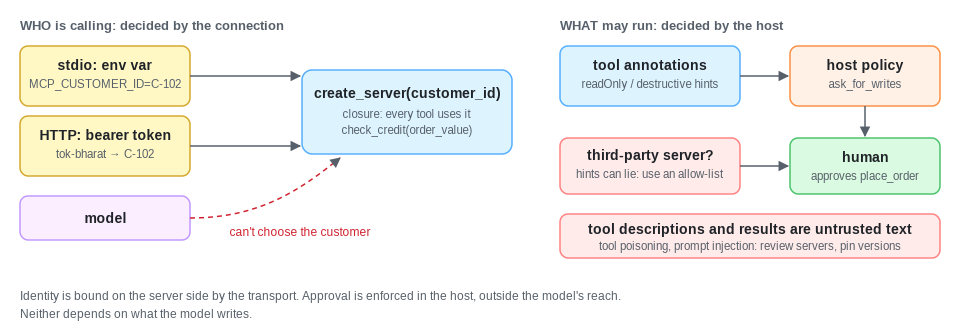
- 06 HTTP and identity. One process, many customers. The bearer token picks the customer before MCP runs; the same
check_creditcall gives two different answers. Stateless: a fresh server per request. - 07 Two servers, two teams. The catalog and the docs search (wrapping
../rag) side by side. The host prefixes tool names and keeps customer and tier consistent across both. This israg/10rebuilt so each team owns its own server.
4. Decisions your team will face
| Decision | Start with | Change when |
|---|---|---|
| MCP or plain tool calling | Plain tool calling inside one app | The same tools serve two or more AI clients, or another team owns the system |
| Server language | The language of the team that owns the system (here Python, so the course needs one toolchain) | Rarely. The SDKs are close; TypeScript has the largest ecosystem (FAQ has a TS example) |
| Transport | stdio for local and desktop use | The server is shared or remote: Streamable HTTP, stateless, behind TLS |
| Identity | Bound at launch (stdio) or from a token (HTTP), inside the server | Never pass it as a tool argument. For production HTTP, use OAuth 2.1 per the MCP auth spec |
| Server size | One server per business domain (catalog, orders, docs) | Tool count passes 10 to 15: split read from write, or by sub-domain |
| Approval | Reads run, every write asks (ask_for_writes) |
Users trust safe writes like quotes: ask only for destructive ones |
| Third-party servers | Your own servers only | A vetted public server: pin the version, allow-list tools, review descriptions |
| Tool results | JSON text plus structuredContent |
Clients need guaranteed shapes: add outputSchema (as on get_price) |
5. What the labs don't cover
The labs use one laptop, fake data and demo tokens. Production adds:
- Real authorization. OAuth 2.1 with your identity provider (Entra ID, Okta, Google and so on), scopes per tool, short-lived tokens, and no token passthrough to downstream APIs.
- Deployment. A container on Cloud Run or GKE, TLS, rate limits, request size limits, timeouts, and health checks.
- Observability. Log every
tools/callwith caller, arguments, latency and result status. This is your audit trail for AI-initiated actions. - Versioning. Tool names and schemas are a public API. Add fields; don't rename or remove without a deprecation path.
- A server registry. Which servers exist, who owns them, which are approved for which hosts. Without it, shadow MCP servers appear.
- Security review. Tool poisoning, prompt injection through results, over-broad credentials (see FAQ.md).
Check yourself
Answer each in a sentence or two, without looking. If one is hard, reread the section in brackets.
- An Acme Build team has one chat app that calls three of its own functions. Would you put those tools behind an MCP server? Why or why not? (sections 1 and 4)
- What does MCP change about tools, and what does it leave the same for the model? (section 2)
- Why does
check_credithave no customer argument, and where does the customer come from instead? (section 3, labs 01 and 06) - Why should the host, not the server, have the final say on whether a tool call needs a human's approval? (section 3, lab 05)
- A teammate finds a public MCP server whose tools are all marked read-only and wants to connect it to the sales copilot today. Would you agree? Why? (sections 3 and 4)
Same pattern, other industries
The labs use a B2B catalog, but the pattern carries across domains. What changes is who owns each server and who is allowed to connect to it.
| Industry | Use case | What changes |
|---|---|---|
| E-commerce (B2C) | One orders and returns server shared by the website chat, the mobile app and the support team's assistant | Same server, different trust per host: customers see only their own orders; support agents can refund, with approval |
| Banking | A core-banking read server used by the relationship-manager copilot and internal analytics | Regulated: OAuth scopes per tool, an audit log of every tools/call, masked account data, no third-party servers |
| Insurance | Separate servers for the policy admin and claims systems, often from different vendors, combined by a claims assistant | Multi-server: keep the policyholder's identity consistent across servers, and vet vendor-built servers before connecting |
| Manufacturing | A plant server exposing machine readings and the maintenance system to engineers' assistants | Runs on-premises next to the machines; read-only by default, and never exposes controls that move equipment |
Going deeper: advanced MCP topics
| Topic | What it solves | Search for |
|---|---|---|
| MCP authorization (OAuth 2.1) | Real per-user identity on HTTP servers | "MCP authorization spec", "OAuth 2.1 protected resource metadata" |
| Sampling | A server needs an LLM (summarise, classify) without its own API key | "MCP sampling createMessage" |
| Elicitation | A server needs a value from the user mid-call ("which delivery address?") | "MCP elicitation" |
| Progress and long-running tasks | Calls that take minutes (bulk quote, ERP sync) | "MCP progress notifications", "MCP tasks" |
| Resource subscriptions | The host should know when a price list or stock level changes | "MCP resources subscribe listChanged" |
| Tool search and dynamic tool lists | Hundreds of tools across many servers | "MCP tool search", "dynamic tool discovery" |
| MCP gateways | Central auth, logging and allow-lists across servers | "MCP gateway", "MCP proxy" |
| MCP security | Poisoned descriptions, rug pulls, confused deputy | "MCP tool poisoning", "MCP security best practices" |
| Agent-to-agent protocols | Agents calling agents, not just tools | "A2A protocol vs MCP" |
Before moving on, try this: add a get_quote(quote_id) tool to b2b_catalog/server.py, write a test for it in test_server.py, and check that customer C-101 cannot read a quote that C-102 created.
Then practise: the exercises in PRACTICE.md: list and cancel quotes, an audit log in the host, pinned and allow-listed tools, then build a delivery tracking server yourself.
Next topic: single agents. The agent will use this MCP server for catalog actions instead of in-process tools.