Ship a lab: from script to service
A lab runs once, for you, and prints to your terminal. A service runs all day, for many people at once, and has to cope with bad input, slow models, crashes and users who close the tab halfway through. Think of a home kitchen and a restaurant kitchen: the recipe is the same, but the restaurant needs order tickets, a pass where someone checks each plate, and a way to hear what came back uneaten.
This page takes one Core lab, rag 04 (answer from documents, with citations), and serves it with FastAPI, streaming and Docker. Then it closes the loop: user feedback that turns into golden-set cases. Do it after the rag topic. The code is in ship/: one file under 200 lines, a Dockerfile and model-free tests.
1. What changes from lab to service
The search, prompt and citation check are imported from rag/rag.py unchanged. Everything new is around them:
| Concern | In the lab | In the service (ship/app.py) |
|---|---|---|
| Input | Whatever you typed | Ask model: 3 to 500 characters, else 422. That caps cost per request and what an attacker can send |
| Output | Printed when done | Streamed token by token (stream: true), or one JSON when you need to block bad answers |
| Errors | A traceback | 503 when search or the model is down; mid-stream, an error event (the 200 is already sent) |
| Slow model | You wait | SHIP_TIMEOUT per call, so a hung call doesn't hold a worker forever |
| Memory of what happened | Your scrollback | One line per answer in data/answers.jsonl: id, question, sources, model, tokens, ms |
| Startup | Each run ingests | Once per start (lifespan); /health says the process is up, /ready says the index has chunks |
| Config | Edit the file | Env vars: LLM_MODEL, EMBED_MODEL, OLLAMA_HOST, SHIP_K, SHIP_TIMEOUT, SHIP_DATA |
| Feedback | You judge it | POST /feedback with the answer id, thumbs up or down and a comment |
2. Run it
cd ship
uvicorn app:app --port 8000          # first start builds the index (~30 s)

curl -N localhost:8000/ask -H 'content-type: application/json' \
     -d '{"question": "How many days do I have to return a bulk order?"}'
# event: token / data: {"text": "Bulk"} ... then event: done / data: {"id": "3f9c2a1b7d0e", "sources": [...], "problems": []}

curl localhost:8000/feedback -H 'content-type: application/json' \
     -d '{"answer_id": "3f9c2a1b7d0e", "rating": "down", "comment": "missed the restocking fee"}'
-N turns off curl's buffering; without it you see everything at the end. Open localhost:8000 in a browser: it goes to
FastAPI's built-in /docs page, where you can try each endpoint. Tests need no model: pytest -q in ship/.
3. Streaming: fast, but the check comes late
def events():
    for piece in door.stream(messages, timeout=TIMEOUT):
        yield sse("token", {"text": piece})          # the buyer reads this now
    problems = rag.check_citations(text, hits)       # runs after the whole answer was shown
    yield sse("done", {"id": answer_id, "problems": problems})
A 20-second answer feels slow; the first word after 2 seconds feels fast, even if the total is the same. That's why chat products stream. The price: an output check can only run on the whole answer, and by then the buyer has read it. So the service has two paths:
- Streamed (
"stream": true, the default): the check result comes in thedoneevent. The client can show a warning or grey out the answer, but can't un-show it. - Buffered (
"stream": false): the check runs first. An answer citing a file the search never returned is replaced with "I don't know" ("blocked": true). The log keeps what the model really said.
Rule of thumb: stream answers people read; buffer answers that trigger money, stock or a promise. The common mistake is streaming a price or a delivery date and then discovering the check failed.
We use Server-Sent Events (SSE): plain text over one HTTP response, event: and data: lines. A browser reads it
with fetch() and a stream reader (EventSource only does GET). WebSockets are for two-way traffic; a chat answer
is one-way.
4. Docker
# from the ai-learning folder, not ship/: the image needs door/ and rag/ too
docker build -f ship/Dockerfile -t ask-docs .
docker run --rm -p 8000:8000 -v "$PWD/ship/data:/app/ship/data" ask-docs
What's in ship/Dockerfile, and why:
- Packages before code. The package layer is cached, so a code change rebuilds in seconds, not minutes.
- Versions from
requirements.lock, used as a constraint: only what ship needs, at the tested versions. - A non-root user, a
HEALTHCHECKon/health, and .dockerignore that lets in only the files the image needs..env,.venv, vector stores anddata/never reach the build. - Secrets at run time: for a hosted model,
docker run --env-file .env .... A key baked into an image is in every copy of it, forever. - The model stays outside. Ollama needs your GPU, which a container on a Mac can't reach, so the container calls
Ollama on your laptop through
OLLAMA_HOST. In production the same line points at a model server or a hosted API.
Reaching Ollama from the container. The default, http://host.docker.internal:11434, works on Docker Desktop
and OrbStack. On Linux, add --add-host=host.docker.internal:host-gateway and start Ollama with
OLLAMA_HOST=0.0.0.0 ollama serve. With Podman, pass -e OLLAMA_HOST=http://host.containers.internal:11434.
Which container tool. Learning on your own: Docker Desktop's free Personal plan is fine. At a company with 250 or more people (or $10M or more in revenue), Docker Desktop needs a paid plan; check with IT or use a free tool: Colima or Podman. The Dockerfile works the same in all of them.
The index is rebuilt each time the container starts (about 30 s). Mount rag/store as a volume to keep it.
5. Feedback to golden set
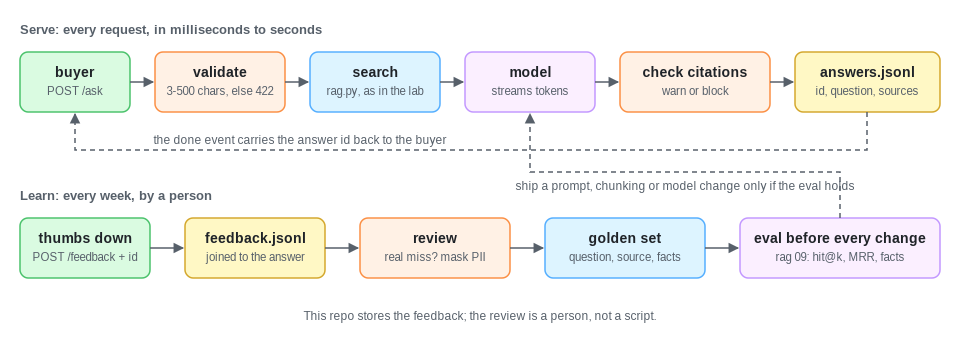
Your golden set (rag lab 09) was written by you, before any user showed up. Real users ask things you didn't think of. Feedback is how their misses become tests, so the same mistake can't come back unnoticed.
What to store, and why each part matters. A thumbs down alone tells you nothing. answers.jsonl keeps the
question, the answer, the sources the search returned and the model; feedback.jsonl points at it by id.
Without the sources you can't tell a search miss (the right section wasn't retrieved) from a model miss (it was, and
the model ignored it). Those need different fixes.
The loop, by a person, every week. This repo only stores the feedback; the steps below are done by people:
- Read the thumbs down, each next to its answer. Drop the noise: "too long", a question outside the documents that got "I don't know" (that one was right).
- Look at the sources. Search miss: fix chunking or search. Model miss: fix the prompt.
- Write a golden case in rag 09's shape. Mask anything personal; real user text never goes into git as it is.
("Restocking fee on a returned bulk order?", ("returns-policy.md", "Bulk orders"), ["10%"]) - Run the eval before and after your fix. Ship only if the new case passes and the old ones still do.
Rule of thumb: a person decides what becomes a test case. The common mistake is auto-adding every thumbs down. Users press it for slow answers, for "I don't know" answers that were correct, or by accident, and then the eval trains you towards their mistakes. Thumbs up is useful too, but as a rate on a dashboard, not as test cases.
6. Decisions your team will face
| Decision | Start with | Change when |
|---|---|---|
| Streaming | Stream answers people read | The answer drives money or stock: buffer and check first |
| Logs of answers | JSONL files, as here | More than one instance, or you need queries: a table, or your tracing tool (rnr 06) |
| Feedback | Thumbs plus an optional comment | Enough volume to sort it: reason buttons ("wrong", "outdated", "didn't answer") |
| Turning feedback into tests | A weekly review by a person | Hundreds a week: sample, and let a judge model pre-sort (rnr 13) |
| Where the model runs | Ollama next to the service | Real traffic: a hosted API behind a gateway (rnr 11), or a GPU model server |
| Concurrency | One uvicorn process | Many users: more workers or replicas; Ollama queues calls (OLLAMA_NUM_PARALLEL) |
7. What this doesn't cover
- Who is calling: login, API keys per customer, and filters by tier (rag 06 shows the filter, mcp-server 06 the token).
- Limits and cost per customer: rate limits, token budgets and a fallback model are in rnr 11.
- Deploying: a registry, Kubernetes or Cloud Run, rolling updates, secrets managers.
- Retention: how long you keep what users typed, and who can read it.
answers.jsonlis personal data.
Try it: add a reason field to Feedback (wrong, outdated, didnt_answer, other), send three thumbs down
with different reasons, then write the one that's a real miss as a rag 09 golden case and run the eval.
Next: rnr, the capstone, where tracing, cost and LLM-as-judge build on the same service shape.